Why Most Calorie Calculators Get Your Numbers Wrong
And the smarter formula that finally nailed mine

By: Jeremy Fox CNC, CPT
Updated: August 15, 2025

If you’ve ever used an online calorie calculator, you probably assumed the number it gave you was accurate. I used to think the same thing.
But back in my 20s, when I was a skinny guy desperately trying to bulk up, those calculators became my nemesis. I’d plug in my stats, follow their calorie recommendations religiously, and… nothing happened.
Week after week, my weight barely budged. At first, I thought it was me. Maybe I just had “bad” genetics.
After months of spinning my wheels, I finally realized the calculators were wrong. Not off by a few calories, but by hundreds.
Checking the Math
Once I realized the calculators were flawed, I started checking the math. The root of the problem lies in the standard formulas for estimating daily calorie needs.
The most widely used is called the Mifflin St-Jeor equation:
- Uses age, gender, height, and weight to estimate Basal Metabolic Rate (BMR)
- Multiplies BMR by an “activity factor” to estimate Total Daily Energy Expenditure (TDEE)
This equation relies heavily on population averages. In other words, they may work fine for the statistical middle, but if you’re even slightly outside average, they can steer you way off course.
Because here’s the thing most people don’t realize:
Two people can be the same height, weight, and age, yet have dramatically different calorie needs.
To the equation, I look like a “normal” 170-pound guy. But because I lift weights and exercise, my lean mass and BMR are higher than average.
A higher BMR generally means you need more calories to sustain your weight. So the Mifflin St-Jeor equation failed because it didn’t account for my individual body composition.

How Body Composition Changes Calorie Needs
Fortunately, there is another formula that adjusts for lean body mass, making it more accurate for athletes, weightlifters, and anyone “outside” the norm.
This second variation is called the Katch-McArdle equation:
- Uses body weight and body fat percentage to calculate lean mass and estimate BMR
- Applies the same “activity factor” to estimate TDEE
To understand how body composition affects calorie needs, let’s put it in perspective with an example. Imagine three men, all 30 years old, 5’9″ tall, weighing 200 pounds, and moderately active.
On paper, they’re identical. But their body composition tells a different story.
Example 1 — Average Build (24% body fat)
- Mifflin-St Jeor: 2,879 calories for TDEE
- Katch-McArdle: 2,887 calories for TDEE
The difference is negligible because this is close to the statistically average body composition for American males. Both formulas give similar results.
Example 2 — Heavier Set (34% body fat)
- Mifflin-St Jeor: still 2,879 calories for TDEE (it doesn’t adjust for body fat)
- Katch-McArdle: 2,582 calories for TDEE (accounts for lower lean mass)
Now the person with more body fat needs nearly 300 fewer calories per day. If they blindly followed the higher number, it would be enough to cause weight gain over time.
Example 3 — Lean & Muscular (14% body fat)
- Mifflin-St Jeor: 2,879 calories for TDEE
- Katch-McArdle: 3,191 calories for TDEE (accounts for higher lean mass)
Here, the leaner person actually needs 300 more calories per day than Mifflin-St Jeor predicts. Over weeks and months, that underestimation can stall muscle growth or even lead to unintentional weight loss.

These examples highlight the risk of ignoring body composition. Even at the same body weight and size, two people can have drastically different calorie needs.
Putting the Formulas to the Test
I wanted to see if the calorie calculations were flawed for others, too. So I started testing them.
First on myself, then on friends and clients of all shapes and sizes. I’d compare their calculated TDEE against their actual calorie needs based on real-world feedback like changes in body weight and appetite.
I also validated the numbers using wearable fitness trackers, like the Apple Watch and Oura Ring. These devices aren’t perfect, but when you average their data over weeks or months, they give a pretty solid baseline for actual daily energy expenditure.
The more data I gathered, the more obvious it became:
Even when body composition was taken into effect, conventional calorie calculators were routinely innaccurate and ineffective.
Problems With Personalization
My small-scale studies revealed that calorie needs varied significantly between individuals, more so than the equations predicted. It seemed like there was a missing variable.
Turns out, I’m not the only one to notice. A study suggests that up to 27% of metabolic variation remains unaccounted for, even when lean mass is factored into the calculation.

This means that the supposedly more accurate Katch McArdle equation can still be off by hundreds of calories.
So what is the “unexplained between-subject variance”? It must lie somewhere in our genetics.
Most of us would agree that people can have a naturally fast or slow metabolism. Understanding this genetic variation is the key to solving the calorie calculator problem.

How I Fixed BMR/TDEE Calculations In Excel
I started by creating a TDEE calculator in Excel using the Katch McArdle equation as a base.
Scaled Metabolic Types
To address the issue of metabolic rate variation, I added a multiplier that scales according to fast and slow metabolisms based on a classification called metabolic types.
The three main types are ectomorph, mesomorph, and endomorph, although many people are a mix. I treat metabolic types as a sliding scale that can adjust BMR for greater accuracy.

Smarter Activity Level
I also noticed that calorie calculators use pretty sophisticated algebra to estimate BMR. But then slap on a rudimentary activity level multiplier to spit out a haphazard guess at TDEE.
They multiply your BMR by a number from 1 to 2 based on how many times you exercise per week. It doesn’t consider how long or intense your workouts are, or how active you are outside the gym.
To solve this, I divided activity level into daily movements based on how much time you spend on your feet. Then I calculate exercise calories burned based on your average heart rate and the duration of your workouts.
This method provides a TDEE for both rest days and workout days, enabling precise calorie targeting and carb cycling.
Find Your True TDEE
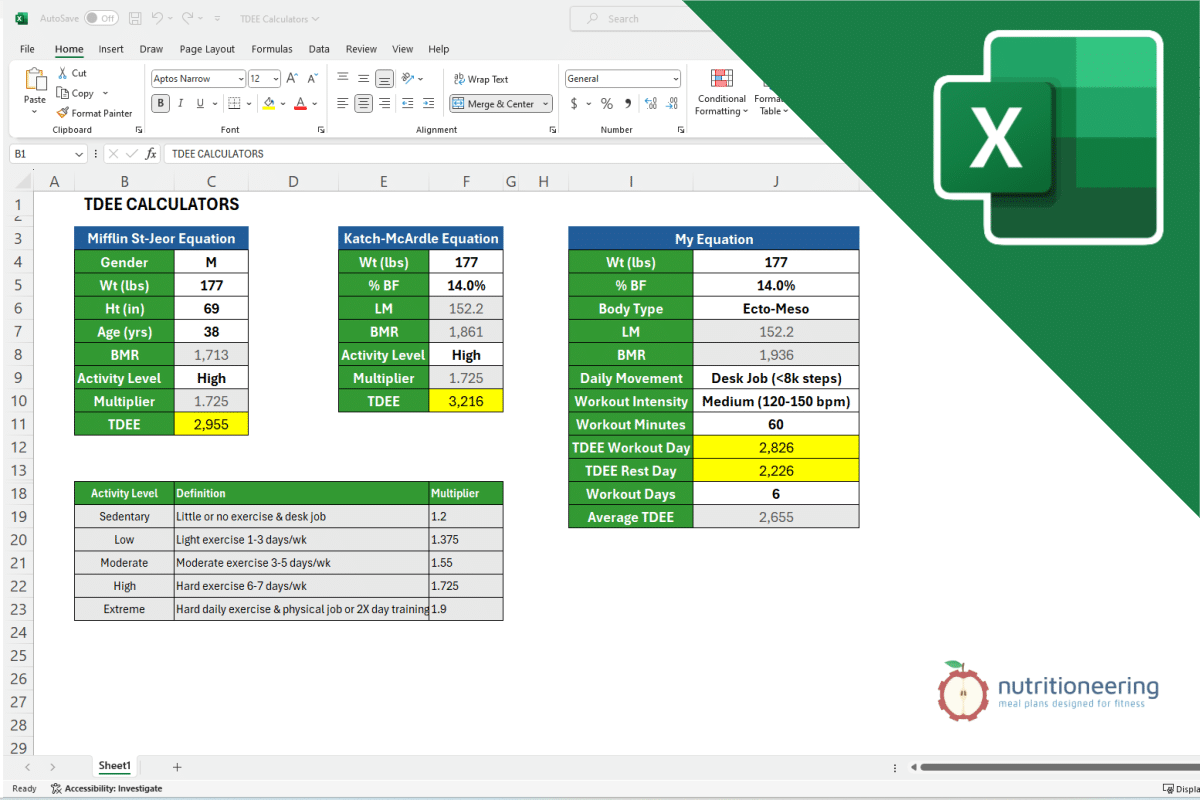
To illustrate this new and improved formula, I entered my numbers into all three calculators and compared the results to my average TDEE, measured by my Apple Watch and Oura ring.
My average TDEE is lower than the standard equations predicted, but my Nutritioneering equation was within 2%.

If there’s one takeaway from this, it’s that your calorie needs are personal and generic formulas don’t always get it right.
Ignoring body composition and genetic differences can leave you spinning your wheels, whether you’re trying to lose fat, gain muscle, or simply maintain your physique.
That’s why I built my own Nutritioneering TDEE Calculator. It goes beyond just height, weight, age, and gender.
- Body fat percentage is factored in to adjust for lean mass.
- Body type multiplier accounts for your natural metabolic variance.
- Separate TDEE results for workout days and rest days ensure you’re fueling appropriately, not just averaging things out.
This approach is the same one I use with my coaching clients to set calorie targets they can actually follow and see results from.
You can try it for yourself with my free downloadable Excel spreadsheet. Just plug in your stats, and you’ll get a personalized set of calorie targets that you can compare against the Mifflin-St Jeor and Katch-McArdle formulas.
👉 Download the free Nutritioneering TDEE Calculator here and see which equation is more accurate!